EDITOR & EXPORT FREE · NO ACCOUNT · NO UPLOAD
Fit more
on every sheet.
Snuglay automatically nests your stickers, cards or labels across a sheet or roll — true to their real outline, not just a rectangular bounding box. It reads the actual cut line straight out of your PDF, the same way a print shop cuts it. Import from LaydoStudio, a finished PDF or an image, and export a print-ready PDF straight from your browser.
Open the app, then choose File → Add to Dock in Safari’s menu bar (macOS Sonoma or later).
CUTCONTOUR‑AWARE NESTING · POWERED BY SVGNEST
Snuglay · nestinglive in the browser
Nested
CutContour Spacing between pieces 6 mm
· narrated by Robert, the maker · loads from YouTube on click
Who it's for
Who's filling the sheet
Four different reasons to open Snuglay. Pick the one that's yours.
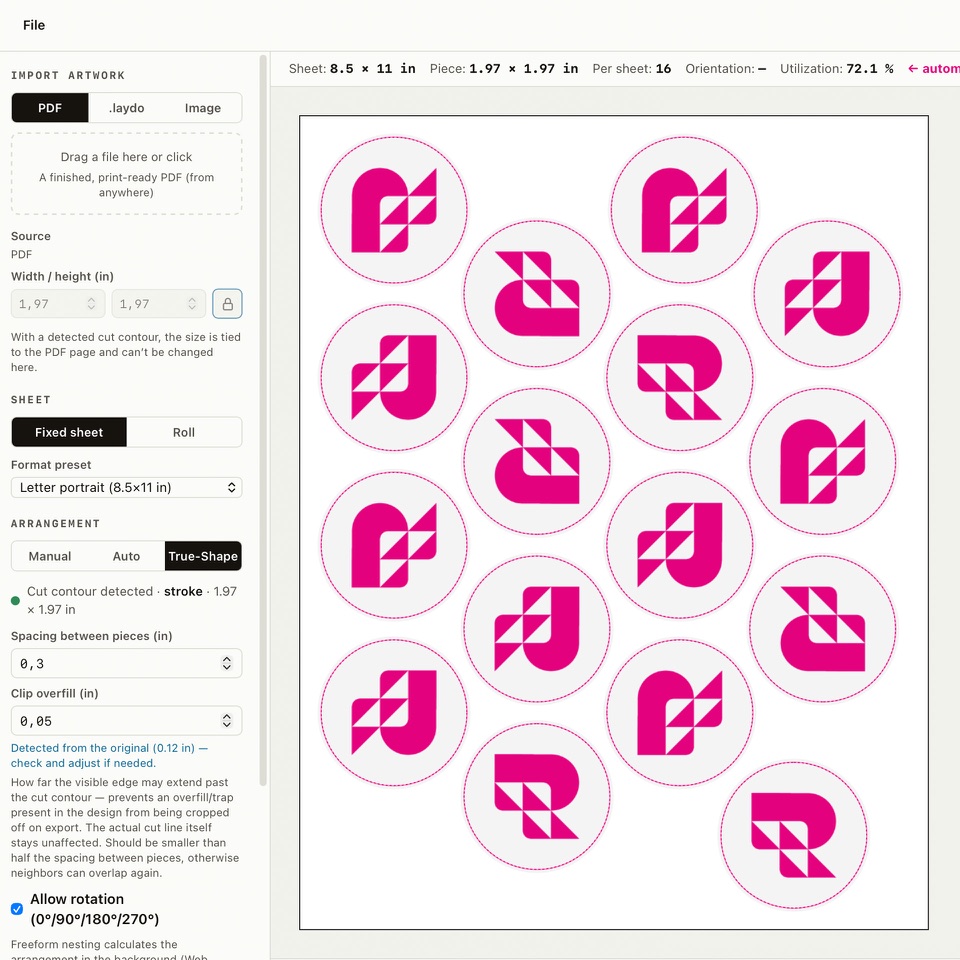
Freeform shapes, not a rectangle you pay for twice
Cutting and craft apps only let you drag pieces around by hand, one at a time. Snuglay reads the CutContour cut line straight out of your PDF and nests the real outline automatically — so a batch of die-cut stickers uses the sheet instead of wasting it on rectangular gaps.
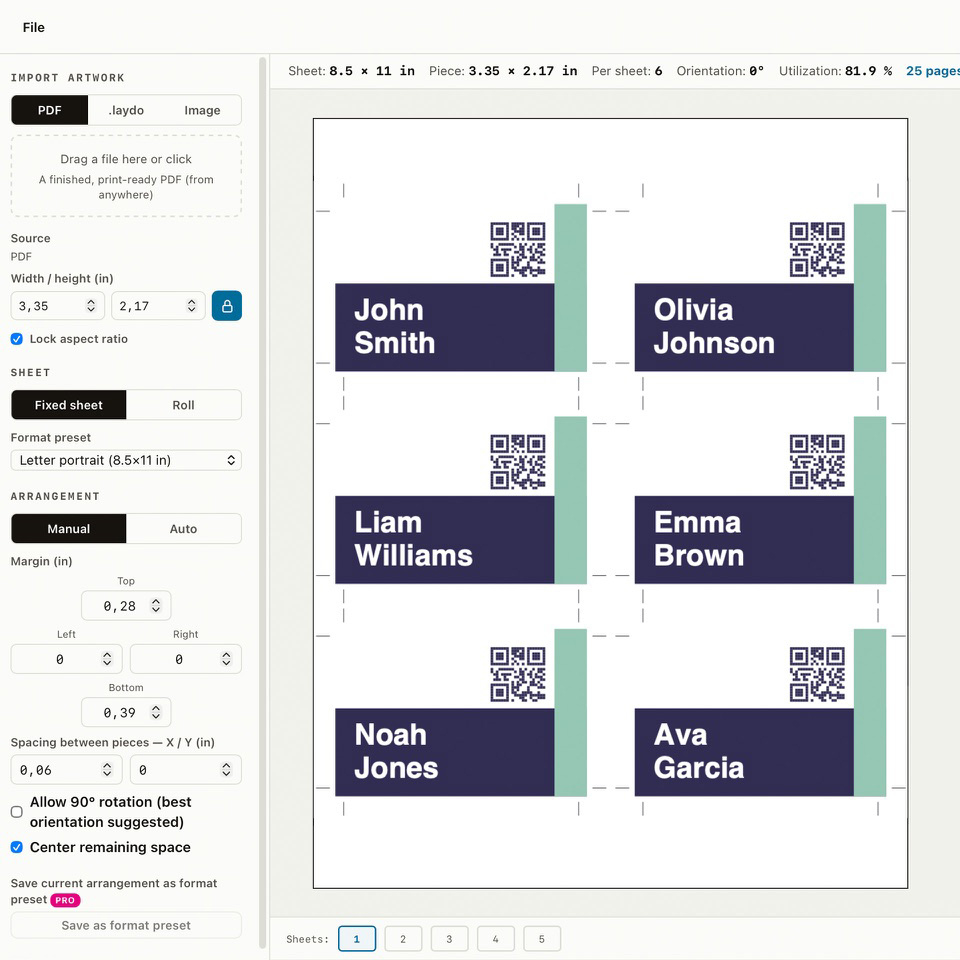
A hundred name badges, one sheet, exact fit
Whether it's stickers for a fundraiser or name badges for a tournament, a club needs an Avery-style sheet used down to the last label — not eyeballed by hand. Snuglay suggests the arrangement automatically and lets you nudge any single piece by hand when it needs to line up exactly, including crop marks, so nothing gets cut off center.
Every roll meter accounted for
Roll mode works out the exact length for a given quantity, automatically or manually rotated for the tightest fit — the same yield thinking as the shop's own RIP station, just instantly in the browser, without tying it up for a quick one-off job.
The last step after the design is done
Finish a flyer, card or label in LaydoStudio, then send it to Snuglay with one click — no file dialog, no re-importing. Snuglay picks up exactly where LaydoStudio left off and arranges it for the sheet or roll.
What it does
The gap between drag-and-drop and a plotter subscription
Cutting/craft apps only let you drag pieces around by hand. Plotter-RIP software and Illustrator nesting plugins aren't cheap and assume a professional setup. Snuglay sits in between.
True-shape nesting, not just a rectangle
Snuglay reads the actual CutContour cut line straight out of your PDF and nests the real outline of a freeform sticker or die-cut — not its rectangular bounding box. Automatic mode tries 0° and 90° rotation and picks whichever fits the most pieces per sheet; manual mode hands you full control over margin, gutter and rotation.
Import from LaydoStudio, PDF or image
One click sends a design straight from LaydoStudio into Snuglay, no file dialog needed. Or drop in any finished, print-ready PDF, or a JPG/PNG — Snuglay checks the image resolution before you export.
Sheet or roll, your choice
Fixed sheet presets for short runs — A4/A3, 30 Avery-compatible label sheets with their exact layout, or a custom size — or roll mode for a fixed material width where you set the quantity and Snuglay works out the length, optionally rounded up to a clean cut interval.
Multi-page files cycle automatically
Import a multi-page .laydo file or PDF and Snuglay cycles through the pages across the sheet (1, 2, 3, 1, 2, 3, …) — handy for a small set of card designs printed together on one run.
Crop marks and a resolution check
Optional corner crop marks in the exported PDF, and a live resolution check for image sources (300 dpi sharp, 150 dpi borderline, below that too low) before you send a file to print.
Free, no account, no upload
Snuglay runs entirely in your browser. There's no login, no cloud storage and no server upload of your design — layout and PDF export both happen locally on your device.
Your files stay with you
Snuglay runs fully in the browser. There are no accounts, no cloud storage and no upload of your design to a server — everything is processed locally and the exported PDF is generated on your own device. Snuglay is a sibling tool of LaydoStudio, part of the same print-tools family from Robikett.
Frequently asked questions
Q01Is Snuglay really free?+
Yes — the editor and print-ready PDF export are completely free, no account needed. A paid Pro plan (€6/month or €48/year) adds saved presets in Snuglay and automatically applies to LaydoStudio too (unlimited pages, automatic saving, Brand-Kit, mail merge, IDML export).
Q02What does "true-shape nesting" mean?+
Instead of treating your design as a rectangular bounding box, Snuglay reads the actual cut line — the CutContour spot color — straight out of your PDF and nests the real outline, fitting more pieces per sheet than rectangle-based tools.
Q03Do I need Illustrator or plotter-RIP software?+
No. Cutting/craft apps only let you drag pieces around by hand, and professional plotter-RIP software or Illustrator nesting plugins aren't cheap. Snuglay sits in between — free, directly in your browser.
Q04Can I import a design straight from LaydoStudio?+
Yes — one click sends a design straight from LaydoStudio into Snuglay, no file dialog needed. You can also drop in any finished, print-ready PDF or a JPG/PNG.
Q05Sheet or roll — which formats are supported?+
Fixed sheet presets (A4/A3, Avery-compatible label sheets or a custom size) for short runs, or roll mode where you set the quantity and Snuglay works out the length — optionally rounded up to a clean cut interval.
Q06Is my data uploaded anywhere?+
No — Snuglay runs entirely in your browser. Layout and PDF export both happen locally on your device, with no login, no cloud storage and no server upload of your design.
Q07Does Snuglay check image resolution before export?+
Yes — a live resolution check for image sources (300 dpi sharp, 150 dpi borderline, below that too low) warns you before you send a low-quality file to print.
Q08Is the exported PDF really color-managed for print?+
Yes — by default every export embeds a real ICC output intent — PSO Coated v3/FOGRA51 (European Color Initiative, eci.org), or GRACoL2013 (Idealliance) automatically for inch/US users — and is marked PDF/X-4, the print industry's standard for reliable color-managed exchange. A directly imported JPG/PNG is actually converted to CMYK, and a design from LaydoStudio arrives with CMYK colors. For wide-format RIPs and your own printers that convert colors themselves, you can switch to RGB in the settings (tagged as sRGB). A third-party PDF page is embedded unchanged either way — Snuglay doesn't change its colors, only how the file is tagged.
Q09I installed Snuglay as a web app – why does “Send to Snuglay” open the browser?+
Browsers always open links from a web app in a regular window; a website can't control that. In Chrome, click “Open in Snuglay” on the right of the address bar afterwards – the tab moves into the app together with the transferred design. In Safari, simply keep working in the browser window.
Q10Does Snuglay know Avery label sheets?+
Yes — 15 US Letter sheets (like Avery 5160, 5163 or 5167) and 15 A4 sheets (like Avery Zweckform 3474 or L7160) are built in, with the exact layout from Avery’s official blank templates. Pick the sheet under “Format preset”, load your PDF, and every label spot is filled; margins and spacing are locked so nothing shifts. If your artwork doesn’t match the label size, Snuglay tells you which size the sheet needs. Still need to design the label? LaydoStudio has the same sheets as templates. Avery is a trademark of Avery Products Corporation; Snuglay is not affiliated with Avery.
Ready to nest your first sheet?
No account, no credit card, no download. Start right in your browser.
Start the app →